2. OpenClaw — Agent Loop, Context, and Models
This article is part of a series of articles around OpenClaw. All of the articles can be found here
OpenClaw does not use a simple “Call LLM → Get Text” architecture. It employs a recursive agentic loop. When a message arrives, the system does not just ask for a reply; it asks for a plan. It grants the model permission to wake up, look around, use tools, and think—repeatedly—until the task is complete.
This chapter dissects the anatomy of that thought process, how we engineer the context that feeds it, and how we manage the scarcity of the token window.
The Loop
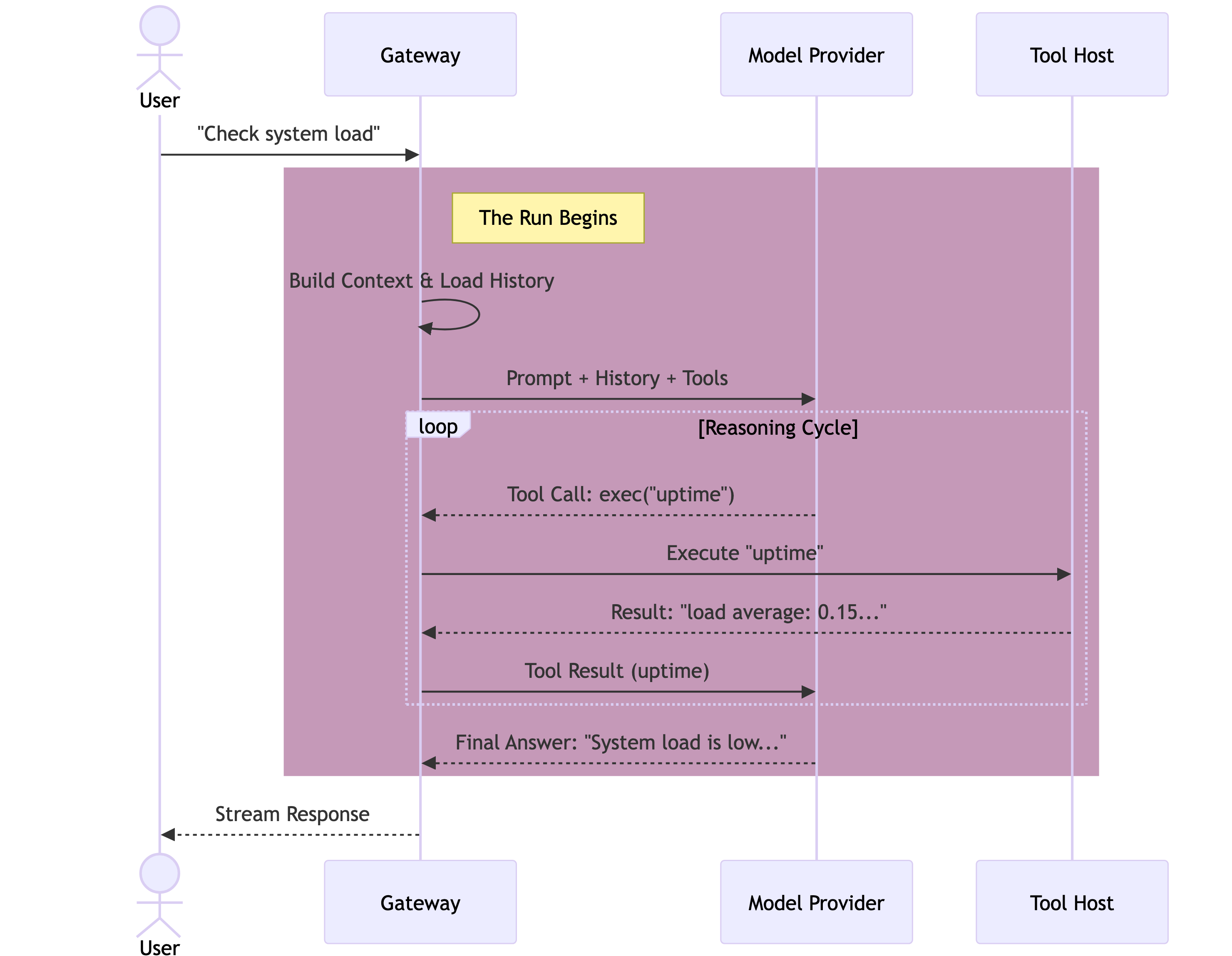
The heart of OpenClaw is the runEmbeddedPiAgent function. Unlike architectures that spawn agents as separate subprocesses or microservices, OpenClaw runs the agent in-process. The Gateway is the runtime.
When a message enters the queue, it triggers a Run. A Run is not a single API call; it is a session-locked thread of execution that persists until the model yields a final answer or times out.
- Intake: The message is normalized from the channel protocol (WhatsApp/Telegram) into a standard User Message.
- Context Assembly: The Gateway constructs the System Prompt and hydrates the conversation history from the
sessions.jsonltranscript. - Inference (The Turn): The context is sent to the Model Provider.
- Tool Execution: If the model requests a tool (e.g.,
read_file,exec), the Gateway pauses, executes the code securely on the host (or sandbox), and captures the output. - Recursion: The tool output is appended to the context, and control is handed back to the model. This cycle repeats.
- Streaming: As the model generates text or “thinking” blocks, these are streamed in real-time to the user via the WebSocket protocol.
Silent Turns
The loop supports a
NO_REPLYtoken. If a heartbeat or background cron job runs and finds nothing noteworthy, the model outputsNO_REPLY. The Gateway detects this and suppresses any outbound message to the user, keeping the chat log clean while still allowing the agent to “think” and update its internal memory.
Context Engineering
The model only knows what is in its Context Window. OpenClaw dynamically assembles this window for every single run. It is not a static string; it is a compiled artifact.
The System Prompt is the root of the context. It is composed of rigid sections:
- Identity: Injected from
SOUL.mdandIDENTITY.md. - Capability: The list of available Tools and their JSON schemas.
- Environment: The current time, the host OS, and the Workspace path.
- Skills: A compact list of available skills. Crucially, skill bodies are not loaded by default to save tokens; the model sees the list and must decide to
reada specific skill definition if it needs instructions.
Compaction & Pruning
Token windows are finite and expensive. OpenClaw employs two distinct strategies to manage “forgetting”: Pruning (Ephemeral) and Compaction (Permanent).
1. Session Pruning (cache-ttl)
This is an optimization specifically for Anthropic’s Prompt Caching.
When a session goes idle longer than the cache TTL (typically 5 minutes), the next request would incur a massive “Cache Write” cost to re-upload the entire history. To mitigate this, OpenClaw runs a Pruning Pass before the API call.
It aggressively trims old tool_result blocks from the in-memory context. We keep the conversation flow (User/Assistant turns) but discard the verbose output of cat or grep commands from days ago. This significantly reduces the size of the prompt that needs to be cached.
2. Auto-Compaction
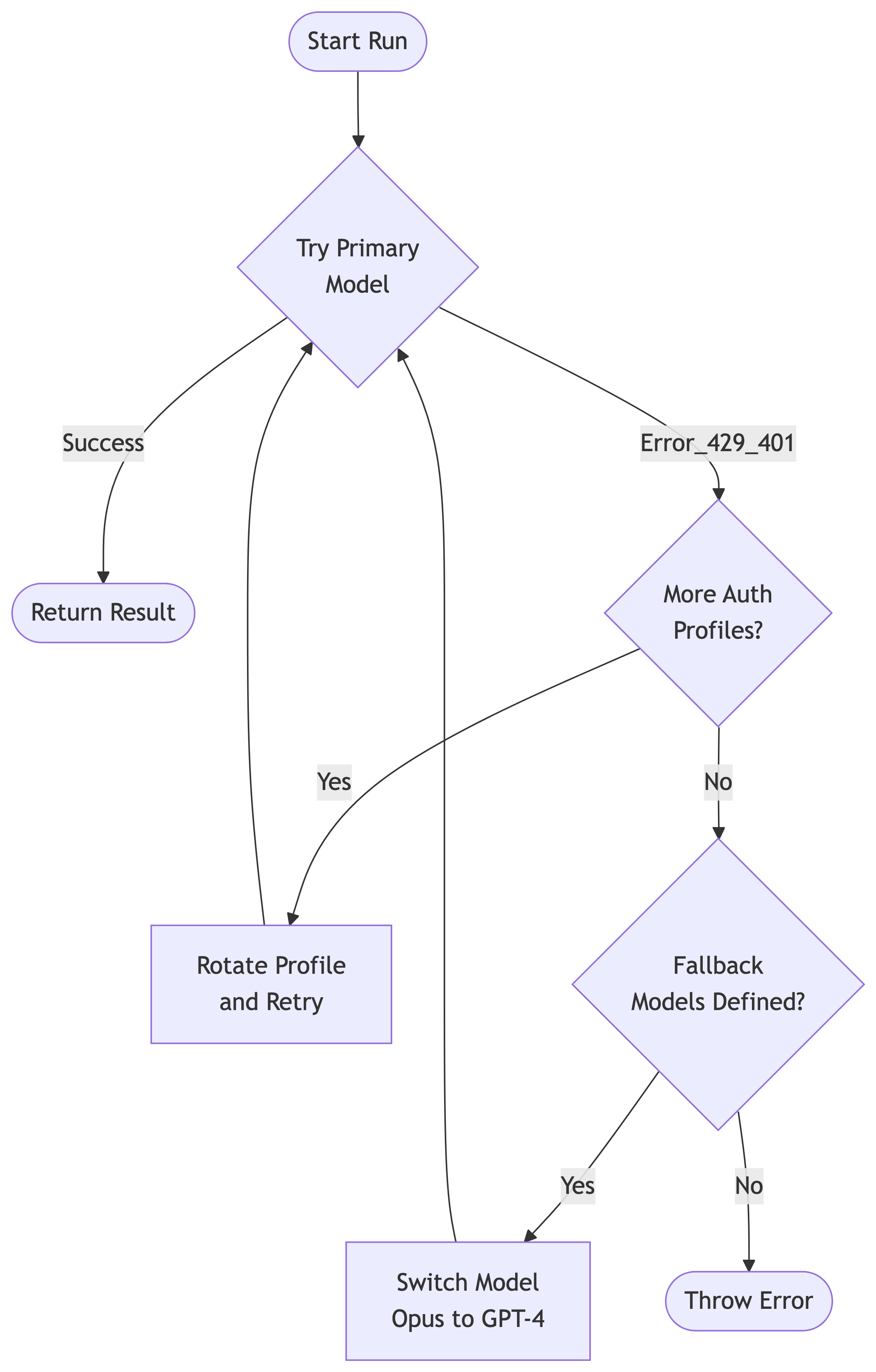
When the total token count exceeds the model’s limit (minus a safety reserve), OpenClaw triggers Compaction. This is a destructive, permanent operation on the session transcript.
The agent reads the oldest chunk of history and summarizes it into a single compaction block. The raw messages are removed from the active context window, replaced by this high-density summary.
The Memory Flush
Before compaction destroys the raw transcript, OpenClaw injects a “Memory Flush” turn. The agent is told: “Context is full. Write any critical facts to
MEMORY.mdnow.” This is the last chance to save specific details (like a phone number or a code snippet) to durable storage before they are compressed into a vague summary.
Auth & Failover
Reliability in an agent gateway is defined by its ability to survive API outages. OpenClaw treats authentication credentials not as static config, but as a rotating pool of resources.
The Auth Sink
Credentials are stored in auth-profiles.json. This separates configuration (routing rules) from secrets (keys). Crucially, this file is mutable by the Gateway. For OAuth providers like OpenAI Codex, the Gateway automatically handles token refreshes and writes the new access_token back to disk without user intervention.
The Failover Cascade
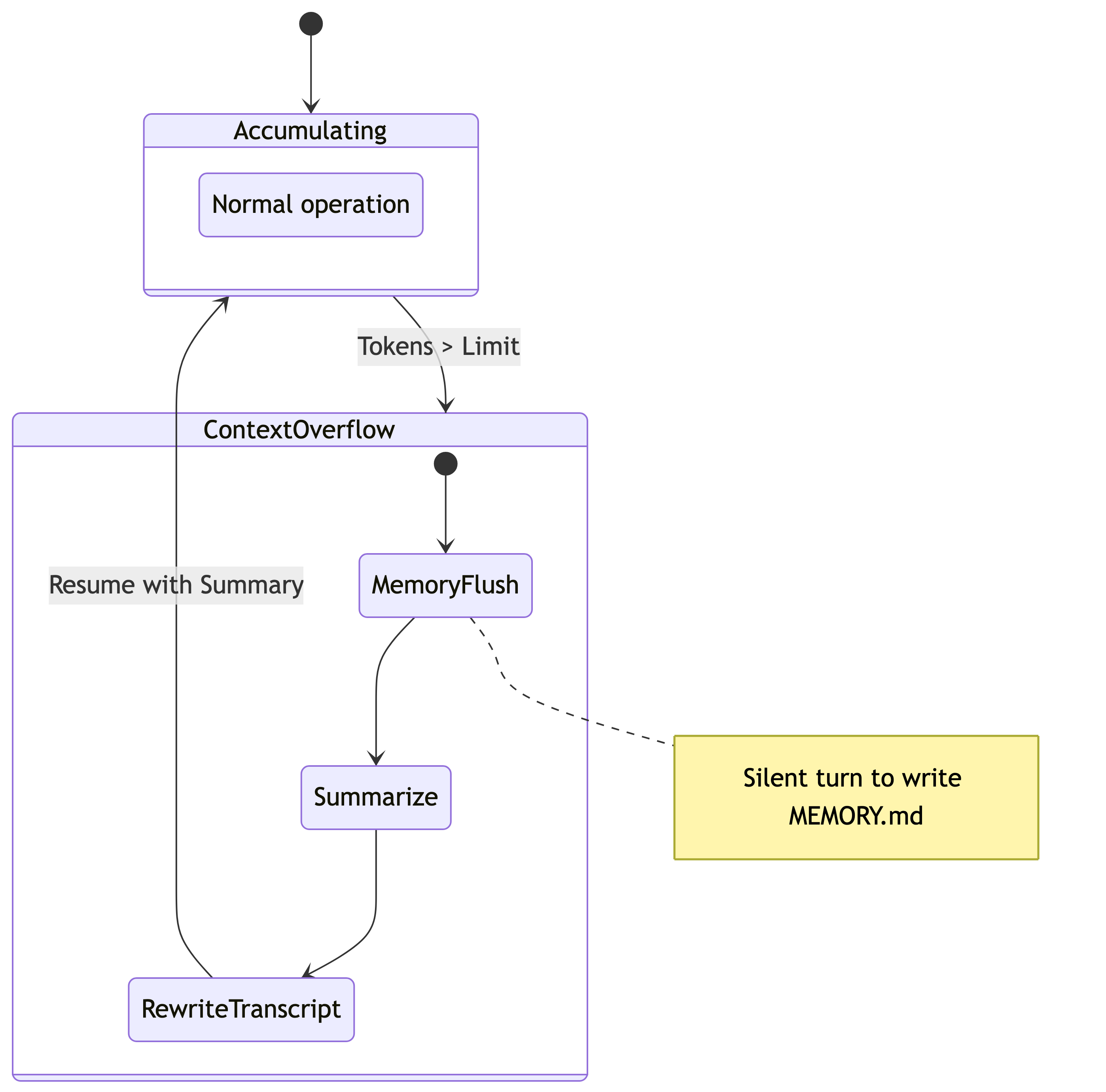
Models fail. Rate limits are hit. APIs go down. OpenClaw implements a deterministic failover state machine.
- Auth Rotation: If a request fails with a 401 (Unauthorized) or 429 (Rate Limit), the Gateway checks if another profile is available for the same provider (e.g., swapping from “Personal API Key” to “Work API Key”).
- Model Fallback: If all profiles for a provider are exhausted (or in cooldown), the Gateway attempts the next model in the
fallbackslist (e.g., failing over fromclaude-3-opustogpt-4o).
Pinning Profiles
By default, the Gateway pins a specific Auth Profile to a session to maximize cache hits. It will only rotate if forced by an error. You can manually override this in chat with
/model model_name@profile_id(e.g.,/model claude-3-opus@work-account) to force a specific billing account for a heavy task.