3. OpenClaw — Channels, Routing, and Nodes
This article is part of a series of articles around OpenClaw. All of the articles can be found here
In OpenClaw, the Gateway serves as the central nervous system. It does not just run the LLM; it manages the physical and digital interfaces that allow the agent to exist in your environment. These interfaces come in two forms: Channels (messaging platforms like WhatsApp and Discord) and Nodes (physical devices like iPhones, Androids, and desktops).
This chapter details the wire protocols that bind these disparate endpoints into a cohesive organism, and the routing logic that decides which “brain” handles which signal.
The Unified Protocol
Early versions of OpenClaw used fragmented protocols—HTTP for webhooks, a custom TCP stream for legacy bridges, and WebSockets for the UI. This has been unified into a single Gateway WebSocket Protocol.
Every client—whether it is the macOS Control UI, an iOS Node in your pocket, or a headless CLI on a server—connects to the same port (default: 18789) and speaks the same language.
The Handshake
The connection begins with a strict connect frame. The Gateway rejects any socket that sends data before identifying itself.
1
2
3
4
5
6
7
8
9
10
11
12
13
14
15
16
17
18
19
{
  "type": "req",
  "id": "1",
  "method": "connect",
  "params": {
    "role": "node",
    "auth": { "token": "s3cr3t..." },
    "client": {
      "id": "ios-client-1",
      "platform": "ios",
      "version": "1.0.0"
    },
    "caps": ["camera", "location", "canvas"],
    "device": {
      "id": "fingerprint_abc123",
      "publicKey": "..."
    }
  }
}
The role field determines the client’s privileges:
operator: Administrative access. Can configure the gateway, view logs, and approve other devices. Used by the CLI and Control UI.node: Functional access. Exposes capabilities (like a camera) to the gateway but cannot reconfigure the server.
Device Identity
OpenClaw uses cryptographic device identity. During the handshake, a client presents a
device.idderived from a keypair. This allows the Gateway to recognize a specific iPhone returning after a network drop, even if its IP address has changed.
Nodes & Peripherals
A Node is a peripheral that extends the agent’s physical reach. When you pair an iOS device running the OpenClaw Node app, you are not just adding a chat interface; you are adding “eyes” (camera), “ears” (microphone), and “presence” (location) to the Gateway.
The Gateway treats connected Nodes as tool resources. If the agent decides to take_photo, the Gateway routes that instruction over the WebSocket to the specific Node ID capable of fulfilling it.
The Pairing Dance
Nodes are untrusted by default. OpenClaw implements a “Gateway-Owned Pairing” model. The Gateway is the authority; the device asks for permission to join the hive.
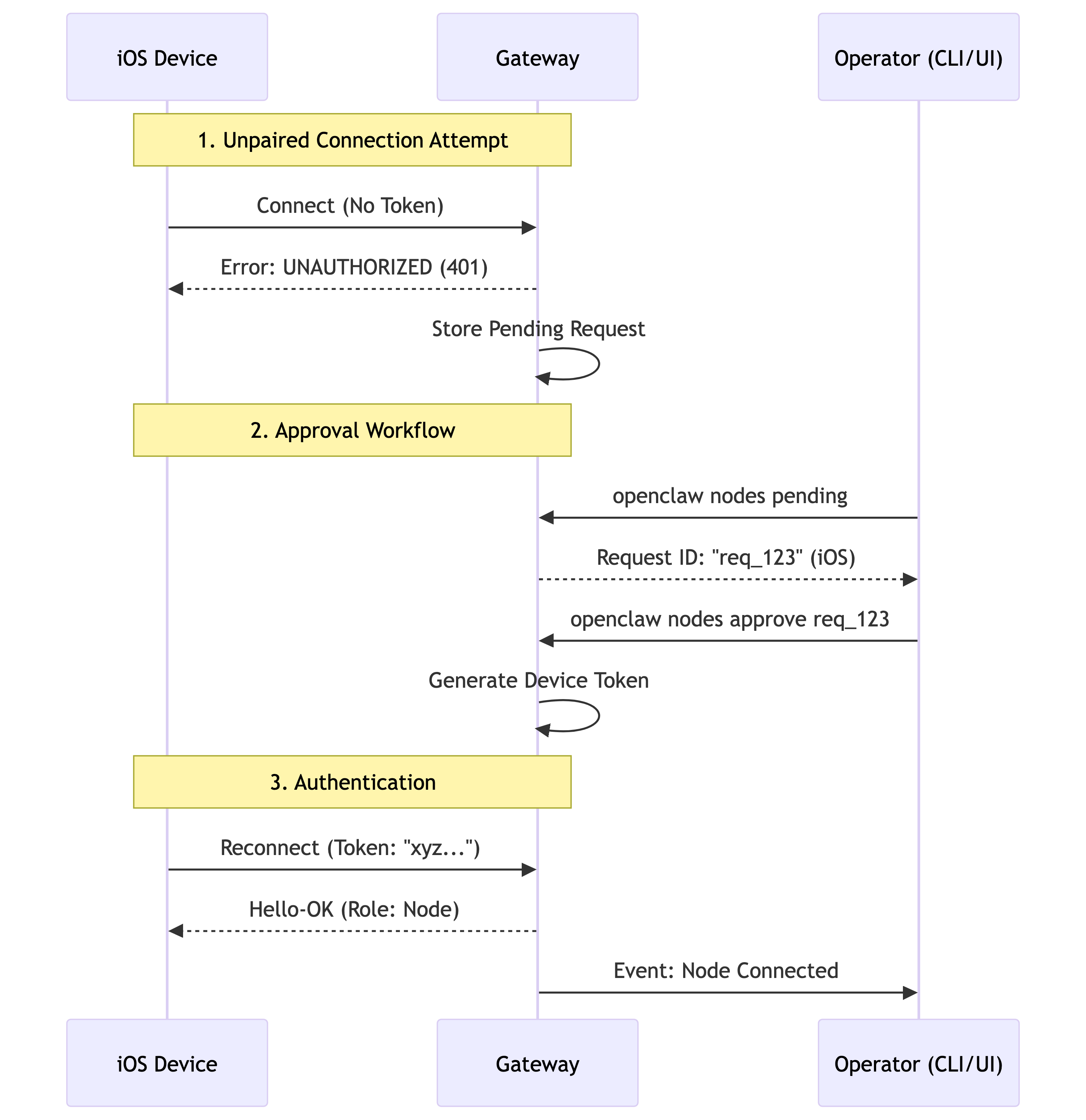
Once paired, the Node maintains a persistent connection. It sends heartbeat frames to keep the socket alive through NATs and firewalls. If the connection drops, the Gateway updates its internal “Presence” map, removing the tool capabilities associated with that device until it returns.
Multi-Agent Routing
OpenClaw is not limited to a single personality. The Gateway can host multiple Agents, each with its own isolated Workspace, Memory, and Auth Profiles.
This architecture enables Multi-Tenancy and Role Separation. You might have:
- “Work Agent”: Has access to your calendar and linear.app API key. Very strict, professional system prompt.
- “Home Agent”: Has access to Home Assistant and Spotify. Casual tone.
- “Dev Agent”: Sandbox mode enabled. Allowed to execute code.
The challenge is Ingress Routing. When a message arrives via WhatsApp, which agent should answer?
The Binding Logic
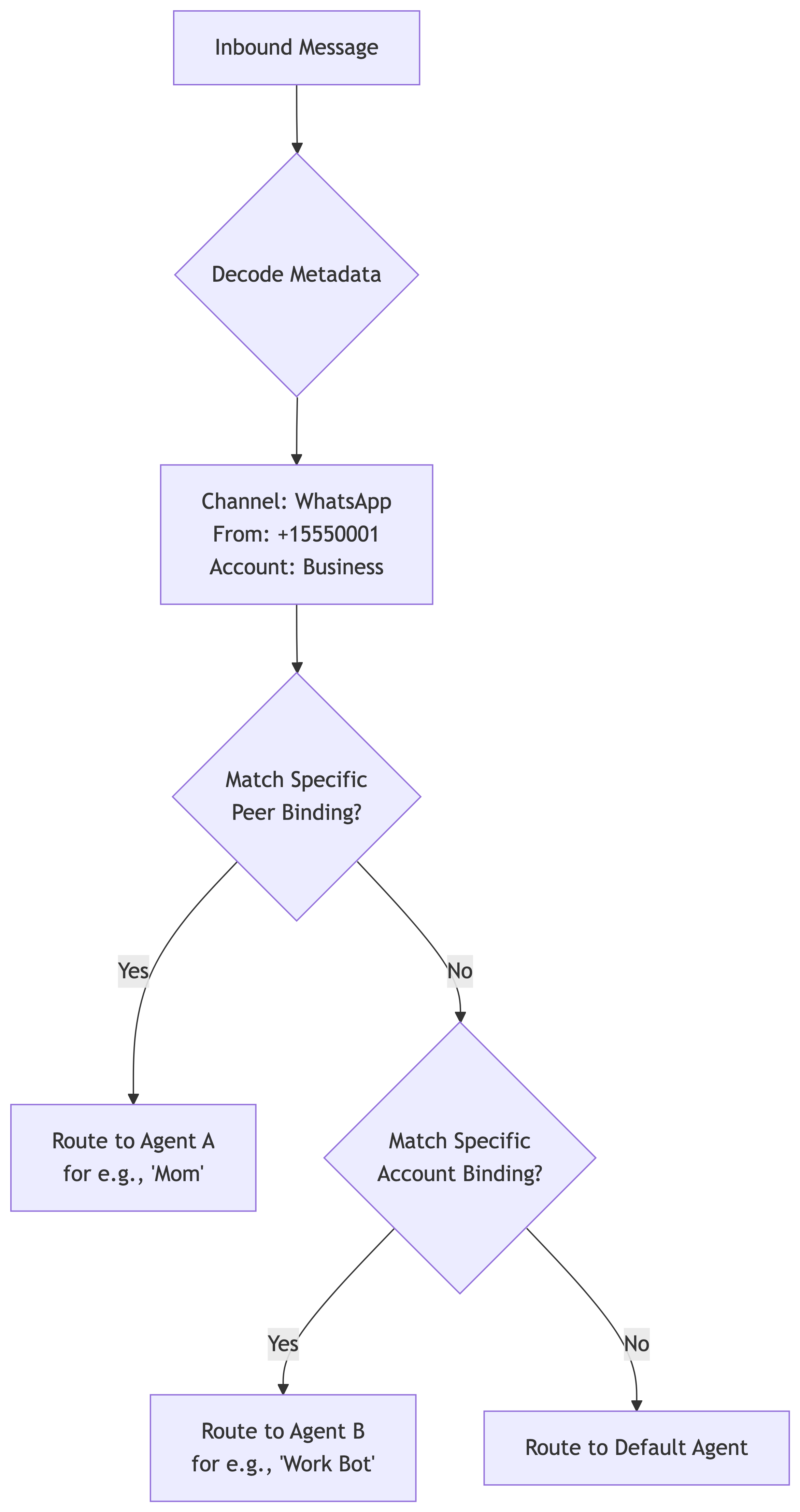
Routing is deterministic. OpenClaw uses a prioritized matching system called Bindings. Every inbound message carries metadata: Channel (e.g., WhatsApp), AccountID (which phone number received it), and PeerID (who sent it).
The Gateway compares this metadata against the bindings configuration in openclaw.json.
Secure DM Mode
By default, OpenClaw creates a “Main Session” for Direct Messages. This provides continuity: if you message the bot from Telegram, then switch to WhatsApp, the bot remembers the conversation because both inputs map to session:main.
However, this is dangerous if multiple people talk to your bot. If Alice tells the bot a secret, and then Bob messages the bot, the shared context means the bot might accidentally reveal Alice’s secret to Bob.
To solve this, you must enable Secure DM Mode by setting session.dmScope: "per-channel-peer".
This changes the session key generation strategy:
- Default:
agent:main(Shared) - Secure:
agent:main:whatsapp:15550001(Isolated)
The Shared Inbox Risk
If you expose your bot to a group chat or allow DMs from multiple users without Secure DM Mode, you are effectively creating a public bulletin board. Always use
per-channel-peerscope unless the bot is strictly for your personal, private use across your own devices.
The Connectivity Stack
Connecting the Gateway to the outside world requires navigating the treacherous waters of NATs and firewalls. OpenClaw supports a hierarchy of transports.
- Loopback (Local): The most secure. The Gateway binds only to
127.0.0.1. Remote clients must use SSH tunneling to reach it. - Tailscale (Tailnet): The recommended path for power users. The Gateway binds to the Tailscale interface IP. Clients discover the gateway via MagicDNS.
- Tailscale Serve/Funnel: The Gateway exposes a public HTTPS endpoint via Tailscale’s relay infrastructure. This is required for webhooks (like Twilio or Gmail Pub/Sub) that need to reach your local machine from the public internet.
Wide-Area Bonjour
While standard Bonjour (mDNS) only works on a local LAN, OpenClaw supports “Wide-Area Bonjour” over Tailscale. By running a local DNS server and publishing SRV records, your iPhone can discover your home Gateway automatically, even when you are on cellular data hundreds of miles away.