1. OpenClaw — Gateway, Workspace, and Identity
This article is part of a series of articles around OpenClaw. All of the articles can be found here
OpenClaw is not a chatbot script. It is an operating system for agency.
Most AI architectures rely on ephemeral execution: a script spins up, processes a request, and dies. State is offloaded to a remote database, and the “identity” of the bot is nothing more than a system prompt string stored in an environment variable.
OpenClaw rejects this model. It operates on the Filesystem Contract. The agent is a ghost that inhabits a specific directory structure on your machine. The Gateway is the engine that keeps that ghost alive, and the Workspace is the physical manifestation of its memory and personality.
To build with OpenClaw, you must first understand where the machine ends and the ghost begins.
The Single Gateway Process
At the heart of the architecture is the Gateway Daemon. This is a single, long-running Node.js process that acts as the traffic controller for all inputs and outputs.
When you run openclaw gateway, you are not just starting a script; you are initializing a WebSocket control plane. By default, this binds to 127.0.0.1:18789.
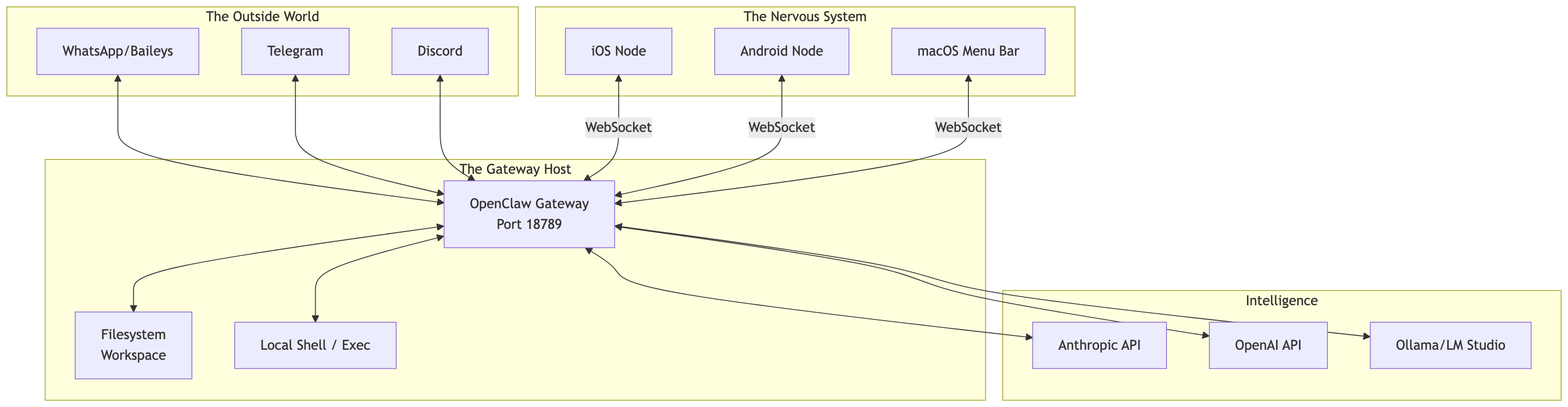
The System Context
The Gateway sits precisely at the intersection of three worlds:
- The External Network: Inbound messages from WhatsApp, Telegram, Discord.
- The Inference Layer: Outbound API calls to Anthropic, OpenAI, or Local LLMs.
- The Local Host: Shell execution, filesystem access, and mobile peripherals.
The Loopback Lock
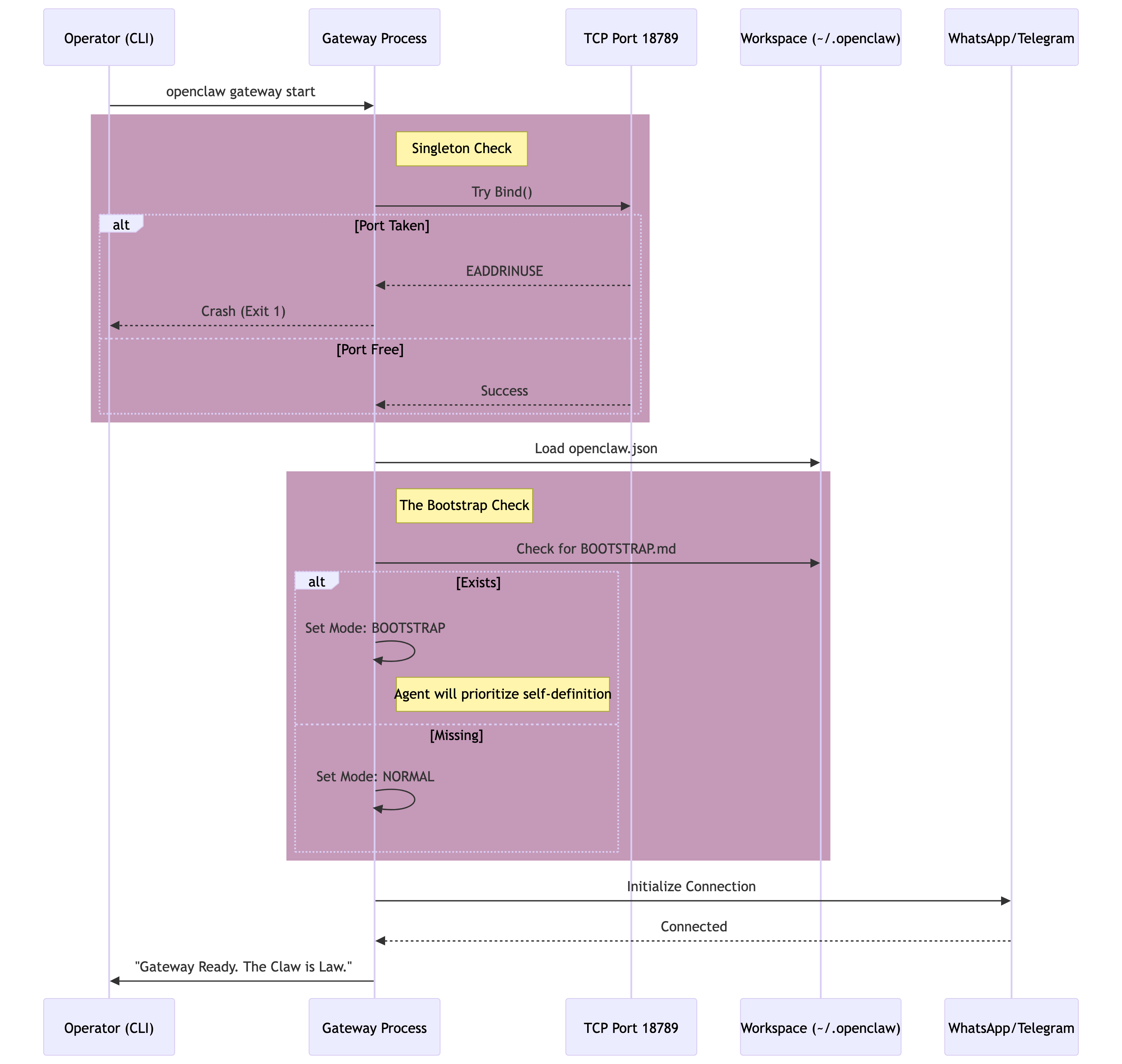
OpenClaw enforces a strict Singleton Pattern. Only one Gateway process is allowed to own the control port (18789) on a host interface. This is not managed by a flaky .lock file that might get stale if the process crashes; it is managed by the OS-level TCP bind.
If you attempt to start a second gateway, it will fail immediately with EADDRINUSE. This is a feature, not a bug. It prevents “Split Brain” scenarios where two instances of an agent try to manage the same WhatsApp session, which would cause the provider to ban your number due to rapid socket flapping.
Dangerous Binds
By default, the Gateway binds to
loopback(localhost). Do not bind to0.0.0.0orlanunless you have configured Gateway Authentication with a strong token. Exposing the Gateway to the public internet without auth allows anyone to execute shell commands on your machine via the API.
The Workspace Contract
In cloud architectures, configuration is hidden in databases. In OpenClaw, the filesystem is the API.
The Workspace (default: ~/.openclaw/workspace) is the source of truth. If a file exists here, the Agent knows about it. If you delete a file, the Agent forgets it. This allows you to manage your AI’s brain using standard tools like git, vim, or VS Code.
The Workspace Contract relies on specific files that are injected into the context window at runtime.
The Sacred Texts
| Filename | Purpose | Dynamism |
|---|---|---|
AGENTS.md | Operating Instructions. The rigid rules, workflows, and high-level directives. | Static (Human edited) |
SOUL.md | Personality Matrix. Defines the tone, vibe, and psychological boundaries. | Static (Human edited) |
IDENTITY.md | Self-Conception. The name, emoji, and avatar the agent uses to identify itself. | Dynamic (Agent can update) |
USER.md | User Profile. What the agent knows about you (preferences, bio, context). | Dynamic (Agent updates over time) |
BOOTSTRAP.md | Birth Protocol. A script run only once on the very first startup. | Ephemeral (Deleted after run) |
When a session starts, OpenClaw reads these files, truncates them if they exceed token limits (agents.defaults.bootstrapMaxChars), and injects them directly into the System Prompt. This ensures that even if you wipe the session history, the agent wakes up with its core identity intact.
Git-Backed Brains
Treat your
~/.openclaw/workspaceas code. Initialize a private git repository inside it. This allows you to roll back changes if the agent hallucinates a bad update toUSER.md, and provides a history of how your agent’s instructions have evolved.
The Bootstrap Ritual
When a new OpenClaw instance is spun up, it is a blank slate. It does not know its name. It does not know you. It enters the Bootstrap Ritual.
This process is deterministic. The Gateway detects a fresh install (presence of BOOTSTRAP.md) and prioritizes the execution of that file’s instructions over all other inputs.
The Startup Sequence
The following diagram illustrates the exact flow from the moment you press Enter on the command line to the moment the Agent is ready to receive messages.
Filesystem Memory
OpenClaw does not use a vector database for its primary memory. It uses Markdown.
Vector databases are opaque; you cannot easily read them, edit them, or debug why an agent retrieved a specific memory. Markdown files are transparent.
Daily Logs
The agent writes a running log of its activities to memory/YYYY-MM-DD.md. This is an append-only journal.
- Pros: Perfect time-series history. Easy for humans to read (“What did the bot do last Tuesday?”).
- Cons: Can grow large.
Durable Memory
For facts that must persist across sessions (e.g., “The user is allergic to peanuts” or “The WiFi password is…”), the agent is instructed to write to MEMORY.md (or memory.md). This file is read at the start of every session alongside the Sacred Texts.
The Memory Flush
OpenClaw implements a “Pre-Compaction Memory Flush.” Before the context window fills up and the system triggers summarization (compaction), the Gateway injects a silent turn instructing the model: “Session nearing compaction. Write any durable notes to memory now.” This ensures that important context isn’t lost when the raw transcript is compressed.
By grounding the AI’s state in the filesystem, OpenClaw achieves persistence without vendor lock-in. Your agent’s brain is just a folder of text files. You can copy it, back it up, or sync it via Dropbox, and the ghost will follow the files.