4. OpenClaw — Tools, Sandbox, and Scheduler
This article is part of a series of articles around OpenClaw. All of the articles can be found here
OpenClaw differentiates itself from standard chatbots by granting the model direct, structured access to your machine. It can execute shell commands, read files, and trigger scripts. This power is the engine of automation, but it is also the primary vector of risk.
This chapter details how the model bridges the gap between text and action via the Tool Interface, how we contain that action within the Sandbox, and how the Gateway Scheduler allows the agent to wake up and work without human intervention.
The Tool Interface
To the Large Language Model (LLM), a tool is just a JSON schema definition injected into the system prompt. When the model outputs a specific JSON structure (e.g., {"tool": "read_file", "path": "README.md"}), the OpenClaw Gateway intercepts the generation, pauses the inference, and executes the requested function.
Core Toolset
OpenClaw ships with a “standard library” of tools designed for an autonomous coding agent:
read/write/edit: Precise filesystem manipulation. Theedittool is optimized for patching code without rewriting entire files, saving tokens and reducing hallucinations.exec: The heavy lifter. Runs shell commands. This tool is the most powerful and the most dangerous.browser: Controls a headless Chrome instance to scrape web pages, take screenshots, or interact with DOM elements.memory_search: Semantic retrieval from the agent’s long-term memory store.
Skills
You extend the agent’s capabilities not by modifying the core code, but by adding Skills. A Skill is a directory containing a SKILL.md file (documentation for the model) and optional scripts.
When you install the himalaya skill for email, OpenClaw injects the skill’s description into the system prompt. The model “learns” it can manage email. If the user asks “Check my inbox,” the model requests to read skills/himalaya/SKILL.md to learn the specific CLI commands, then executes them via exec. This Just-In-Time learning keeps the context window lean.
Sandboxing
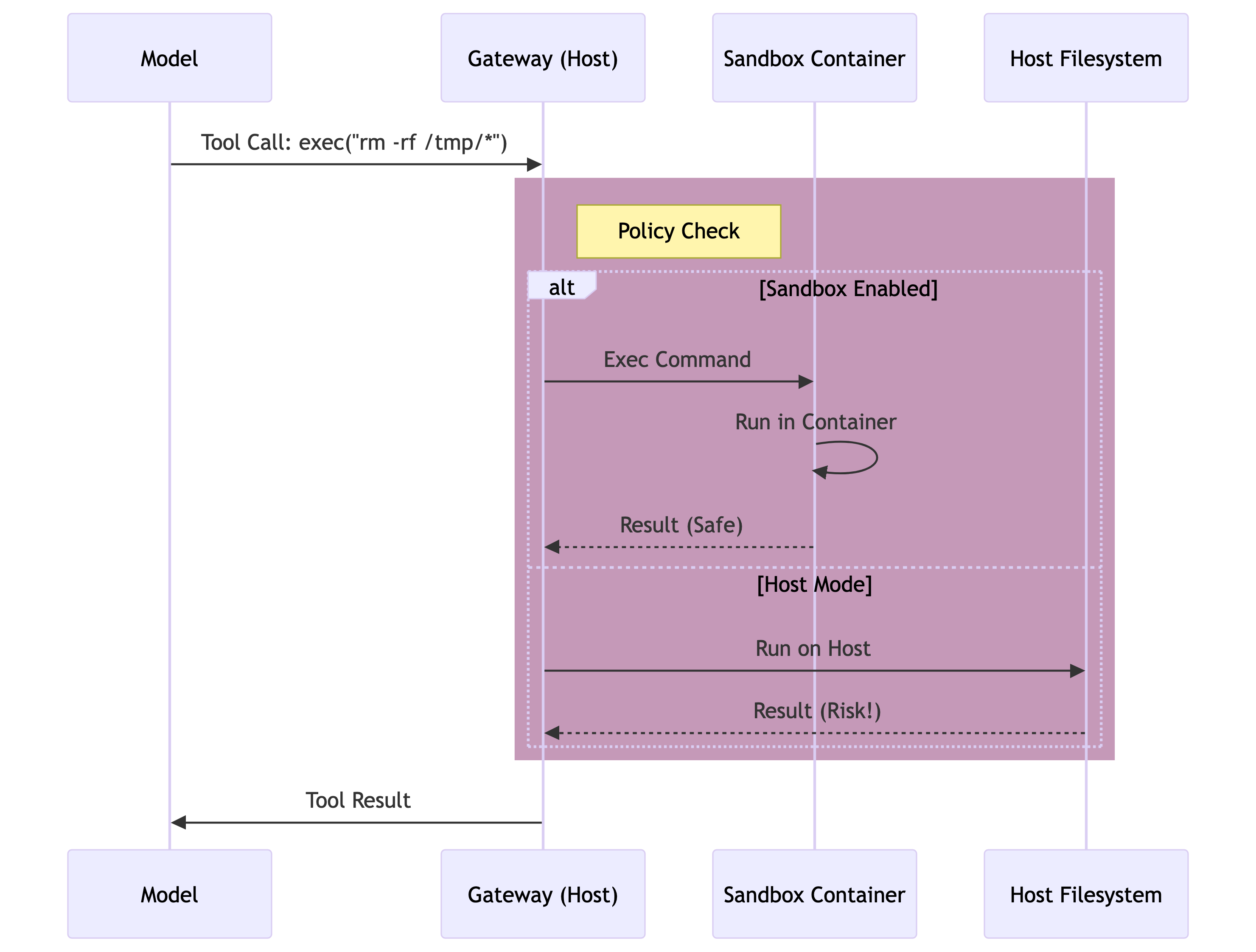
Allowing an LLM to run exec on your host machine is a high-trust operation. For tasks involving untrusted input (like summarizing a PDF from the internet) or risky operations (like refactoring a codebase), OpenClaw provides the Sandbox.
The Sandbox is an ephemeral Docker container. When enabled (agents.defaults.sandbox.mode: "all" or "non-main"), tool execution is redirected from the Host OS to the Container.
- Filesystem Isolation: The agent sees a pristine Linux environment.
- Workspace Mounting: You control visibility.
workspaceAccess: "rw": The agent can modify your project files (mounted as volumes).workspaceAccess: "ro": The agent can read but not touch.workspaceAccess: "none": The agent is fully isolated in an empty box.
- Network Isolation: By default, the sandbox has no internet access unless explicitly granted.
Elevated Mode
Sometimes you need the agent to configure your actual machine (e.g., installing a Homebrew package). Elevated Mode is the escape hatch. If
tools.elevatedis allowed for your user ID, you can explicitly request an unsafe execution, bypassing the sandbox for that specific command.
The Scheduler (Cron & Heartbeat)
True agency requires proactivity. The agent shouldn’t just wait for you to type; it should wake up to check your email, monitor server logs, or remind you of tasks.
OpenClaw implements an internal scheduler that runs inside the Gateway process, independent of any client connection.
The Heartbeat
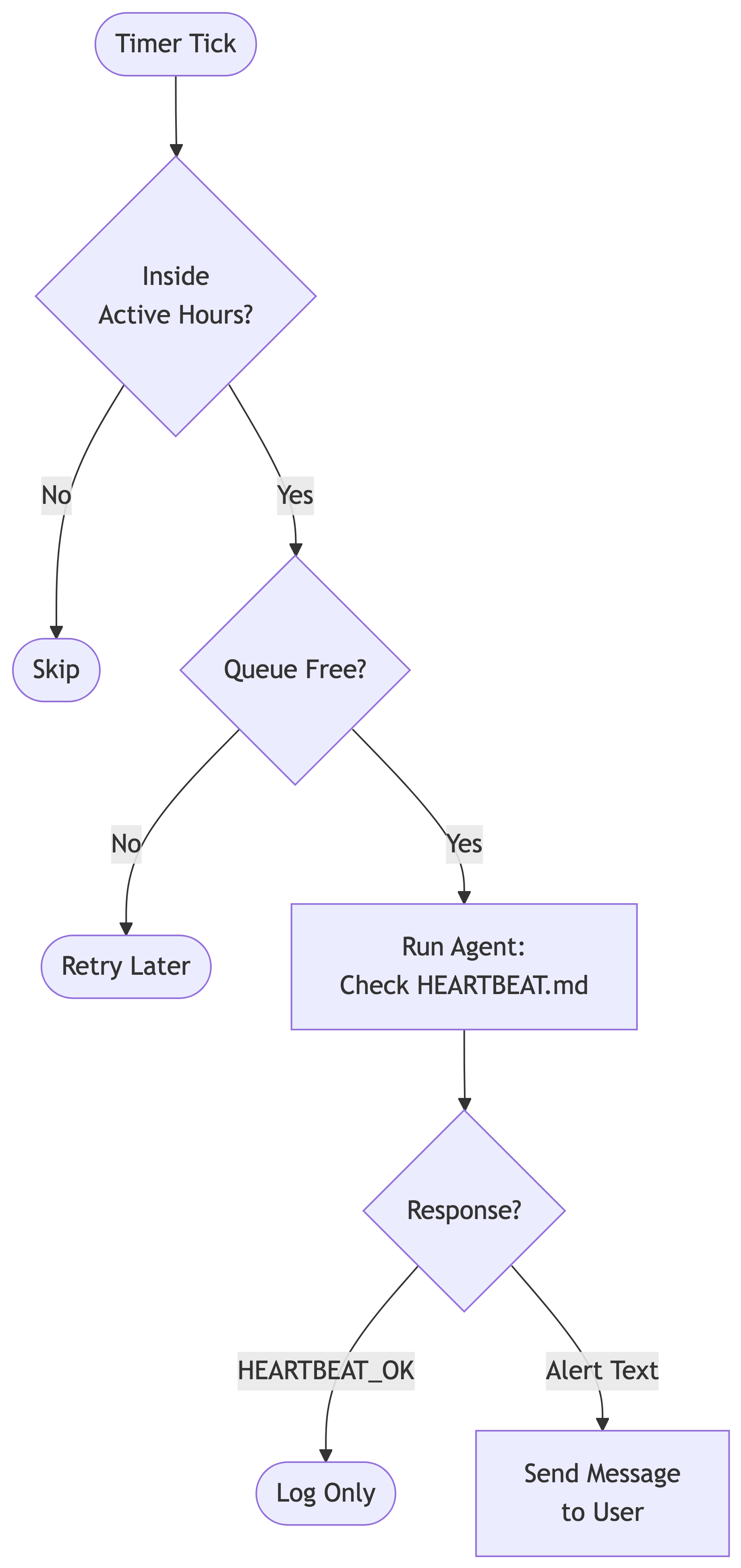
The Heartbeat is a rhythmic pulse, typically every 30 minutes. It triggers a run in the Main Session with a specific prompt: “Read HEARTBEAT.md. If nothing needs attention, reply HEARTBEAT_OK.”
- Context Aware: Because it runs in the main session, it remembers your recent conversations.
- Silent by Default: If the model determines everything is fine, it emits the
HEARTBEAT_OKtoken. The Gateway suppresses this output, so your phone doesn’t buzz every 30 minutes with “Nothing to report.” - Active Hours: Configurable windows (e.g., 9 AM - 5 PM) prevent the agent from waking you up at night.
Cron Jobs
While Heartbeats are for general awareness, Cron Jobs are for specific tasks. A Cron Job in OpenClaw creates an Isolated Session (cron:<job_id>).
- Isolation: The job runs in a fresh context. It doesn’t pollute your main chat history with “Checked RSS feed… nothing new” logs.
- Model Override: You can use a cheaper/faster model (e.g.,
gpt-4o-mini) for routine scraping tasks, while keeping your main chat on a smarter model (e.g.,claude-3-opus). - Delivery: Results can be “Announced” (sent to your chat) or kept internal (updating a file in the workspace).
Cron vs. Heartbeat
Use Heartbeat for “ambient monitoring” where the agent needs to know your context (e.g., “Remind me to call Mom if I haven’t mentioned it today”). Use Cron for “rigid automation” (e.g., “Scrape this website every morning at 8 AM and summarize it”).